#designsystem
#AI
#Figma
#dashboard
MemorialCare Information Services Gateway
MemorialCare Information Services Gateway
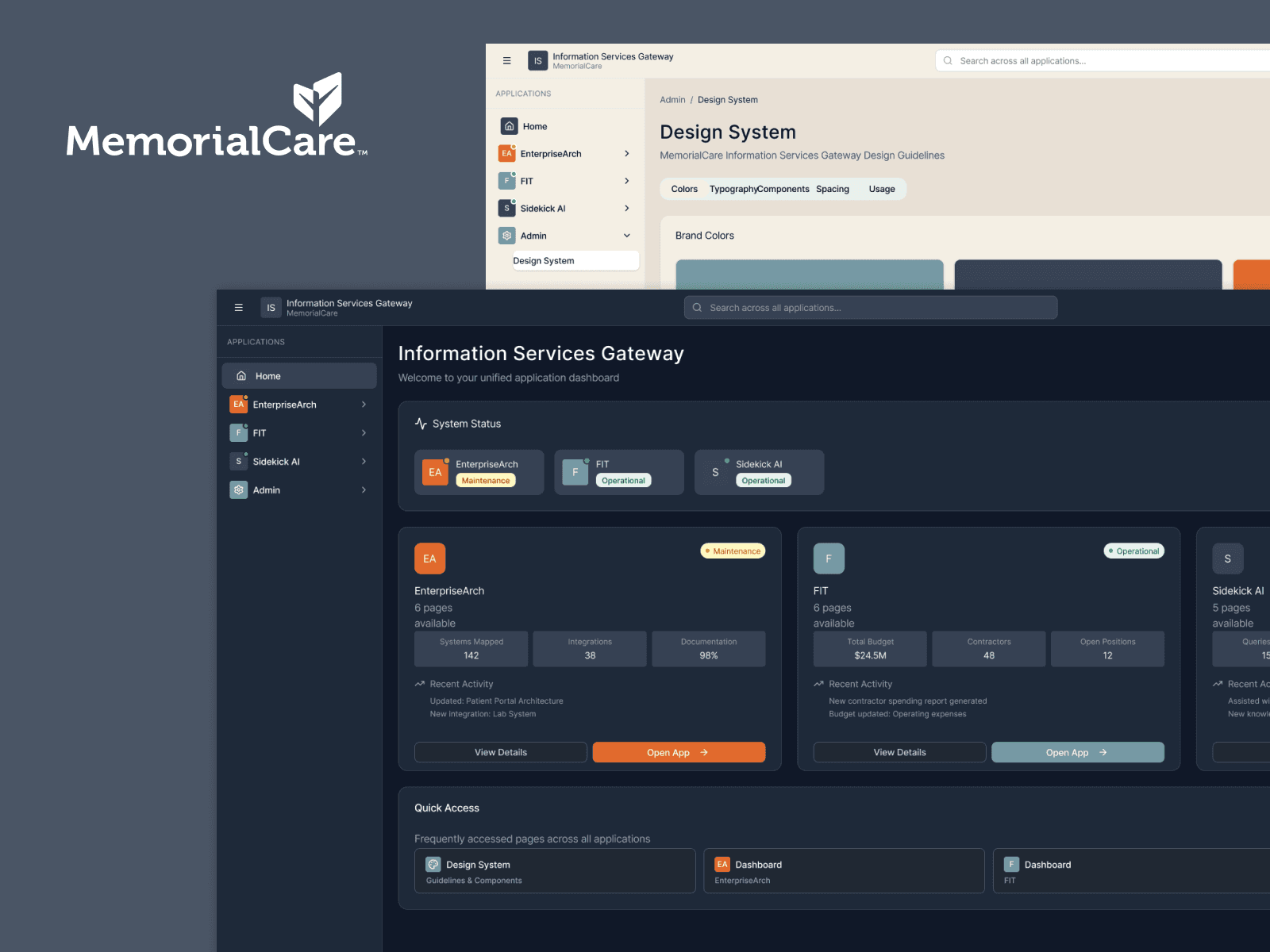
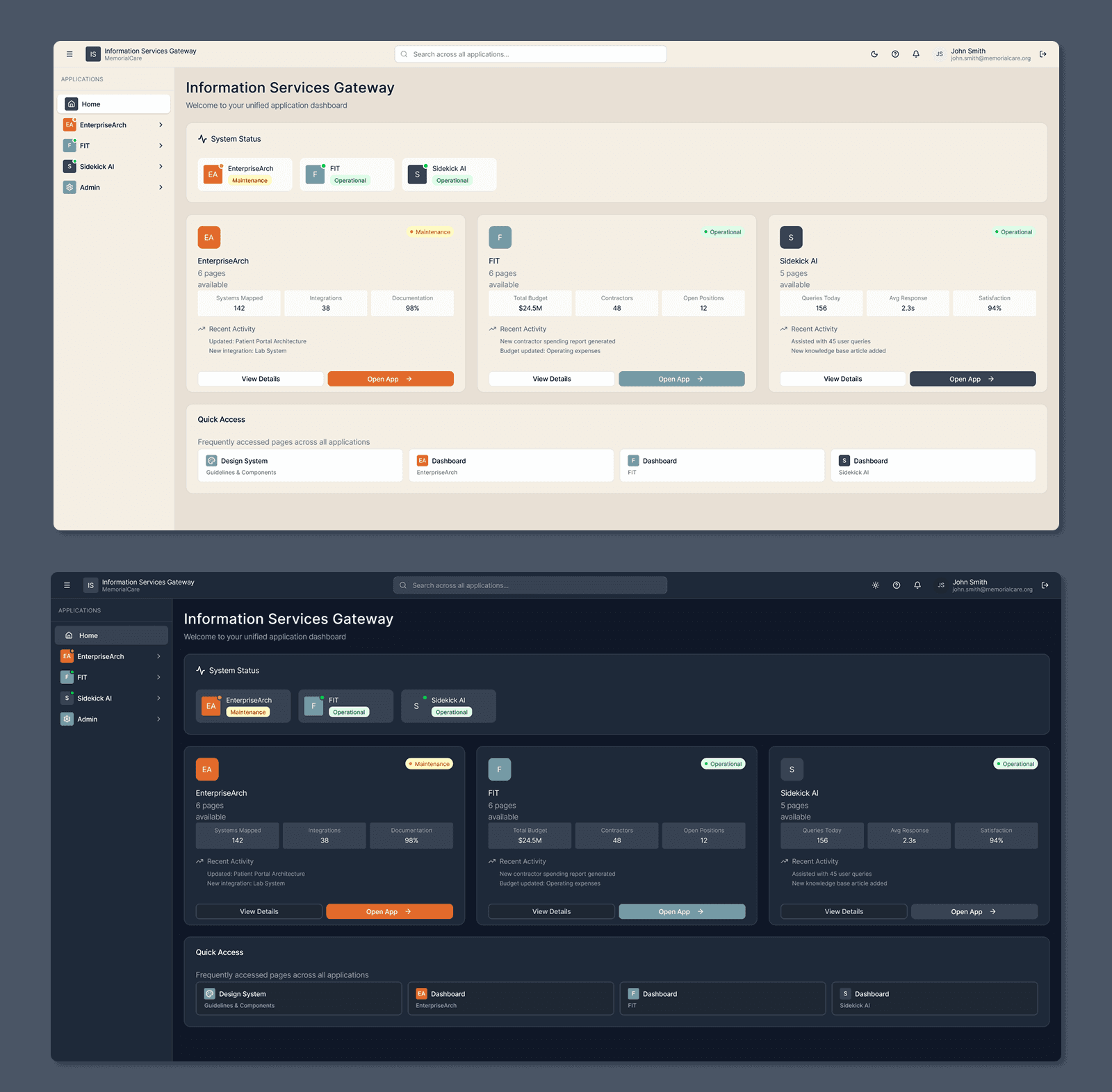
The Information Services Gateway is a unified dashboard that gives Information Services teams a real-time view of application health, system status, and access to internal tools. Designed as a scalable foundation, it standardizes UI patterns and supports both light and dark themes across multiple enterprise applications.
The Information Services Gateway is a unified dashboard that gives Information Services teams a real-time view of application health, system status, and access to internal tools. Designed as a scalable foundation, it standardizes UI patterns and supports both light and dark themes across multiple enterprise applications.
Ongoing
Timeline
Product / UX UI Designer
Role
Ongoing
Timeline
Product / UX UI Designer
Role
Background
Background
As MemorialCare’s Information Services organization grew, teams relied on a growing number of internal applications to manage systems, infrastructure, and operations. While each tool served a specific purpose, there was no single place to understand the overall health of applications or quickly access the right system.
Information Services leaders and technical teams needed a centralized gateway—one that could surface application status at a glance, provide clear ownership and context, and act as a consistent entry point into multiple internal tools. The Information Services Gateway was created to solve this problem: a unified, scalable web application that brings visibility, clarity, and consistency to MemorialCare’s internal technology ecosystem.
As MemorialCare’s Information Services organization grew, teams relied on a growing number of internal applications to manage systems, infrastructure, and operations. While each tool served a specific purpose, there was no single place to understand the overall health of applications or quickly access the right system.
Information Services leaders and technical teams needed a centralized gateway—one that could surface application status at a glance, provide clear ownership and context, and act as a consistent entry point into multiple internal tools. The Information Services Gateway was created to solve this problem: a unified, scalable web application that brings visibility, clarity, and consistency to MemorialCare’s internal technology ecosystem.
Problem
Problem
MemorialCare’s Information Services team relied on multiple disconnected internal tools to monitor application health, system status, and infrastructure ownership.
This caused:
Fragmented visibility across apps and services
Time lost switching between systems
Inconsistent UI patterns and terminology
Limited insight into application health at a glance
Leadership needed a single source of truth—a gateway where teams could quickly understand:
Which applications exist
Their current operational status
Ownership, documentation, and related systems
MemorialCare’s Information Services team relied on multiple disconnected internal tools to monitor application health, system status, and infrastructure ownership.
This caused:
Fragmented visibility across apps and services
Time lost switching between systems
Inconsistent UI patterns and terminology
Limited insight into application health at a glance
Leadership needed a single source of truth—a gateway where teams could quickly understand:
Which applications exist
Their current operational status
Ownership, documentation, and related systems
Goals
Goals
Design a centralized web application that:
Acts as a gateway to internal IS tools
Provides real-time system visibility at a glance
Scales across multiple sub-applications
Establishes a reusable design foundation for future IS tools
Supports both light and dark themes for different working environments
Design a centralized web application that:
Acts as a gateway to internal IS tools
Provides real-time system visibility at a glance
Scales across multiple sub-applications
Establishes a reusable design foundation for future IS tools
Supports both light and dark themes for different working environments
Users
Users
Primary users
Information Services leadership
Engineers and system administrators
Application owners and technical managers
User needs
Fast status checks without deep navigation
Clear system health indicators
Easy access to sub-applications
Consistent, predictable UI across tools
Primary users
Information Services leadership
Engineers and system administrators
Application owners and technical managers
User needs
Fast status checks without deep navigation
Clear system health indicators
Easy access to sub-applications
Consistent, predictable UI across tools
Design Process
Design Process
1
Discovery & Definition
I worked closely with stakeholders to define: • Core data points needed at the dashboard level • What “status” actually means across different systems • Which actions users needed most frequently This informed a card-based dashboard model that balances overview with depth.
1
Discovery & Definition
I worked closely with stakeholders to define: • Core data points needed at the dashboard level • What “status” actually means across different systems • Which actions users needed most frequently This informed a card-based dashboard model that balances overview with depth.
2
Rapid Exploration with AI-Assisted Design
To accelerate early exploration: • I used Figma Make to generate multiple layout and visual concepts via prompts • Quickly evaluated hierarchy, density, and tone • Selected promising directions and moved them into Figma for refinement This approach allowed faster iteration while keeping design decisions intentional and human-led.
2
Rapid Exploration with AI-Assisted Design
To accelerate early exploration: • I used Figma Make to generate multiple layout and visual concepts via prompts • Quickly evaluated hierarchy, density, and tone • Selected promising directions and moved them into Figma for refinement This approach allowed faster iteration while keeping design decisions intentional and human-led.
3
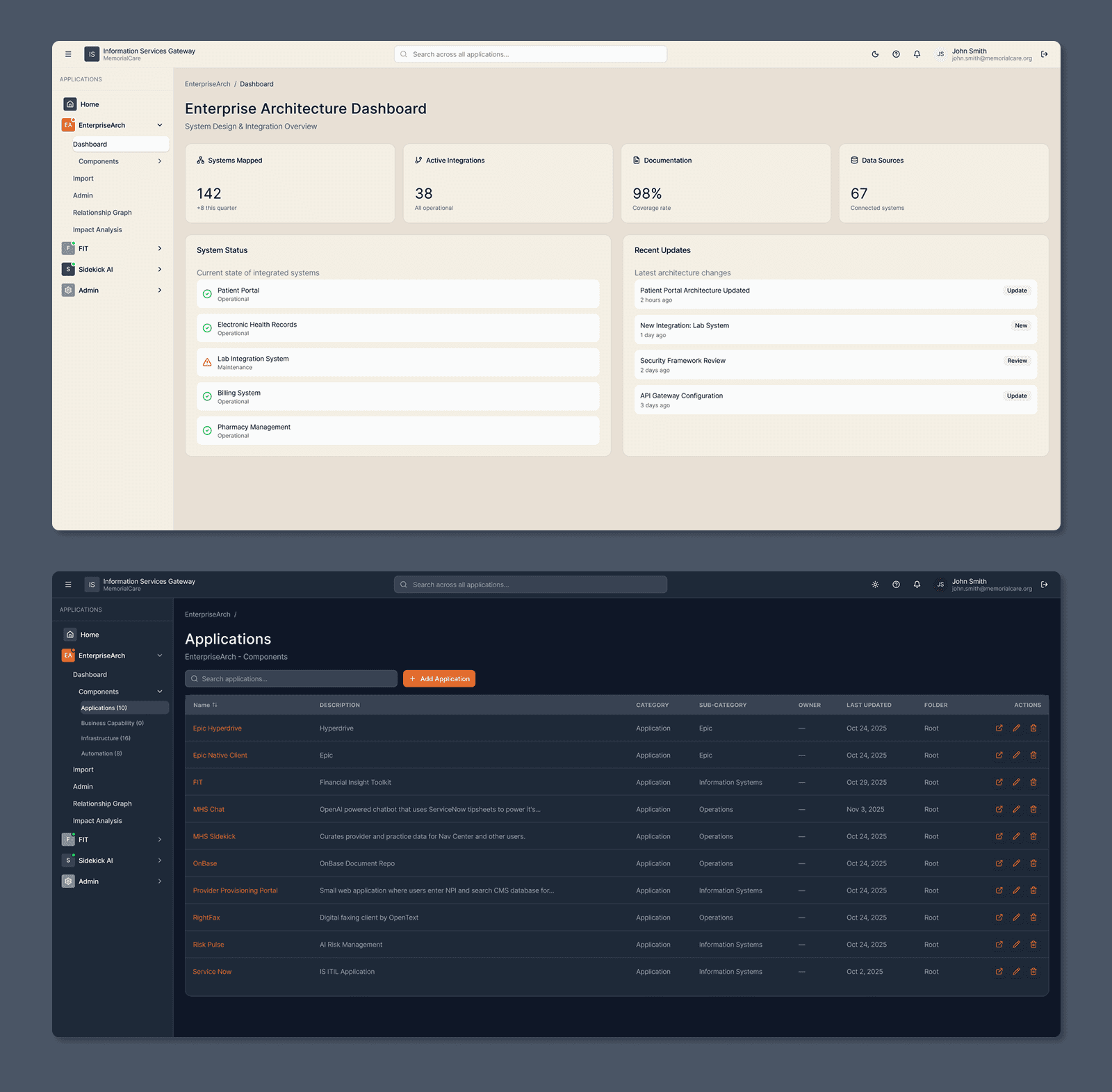
Information Architecture
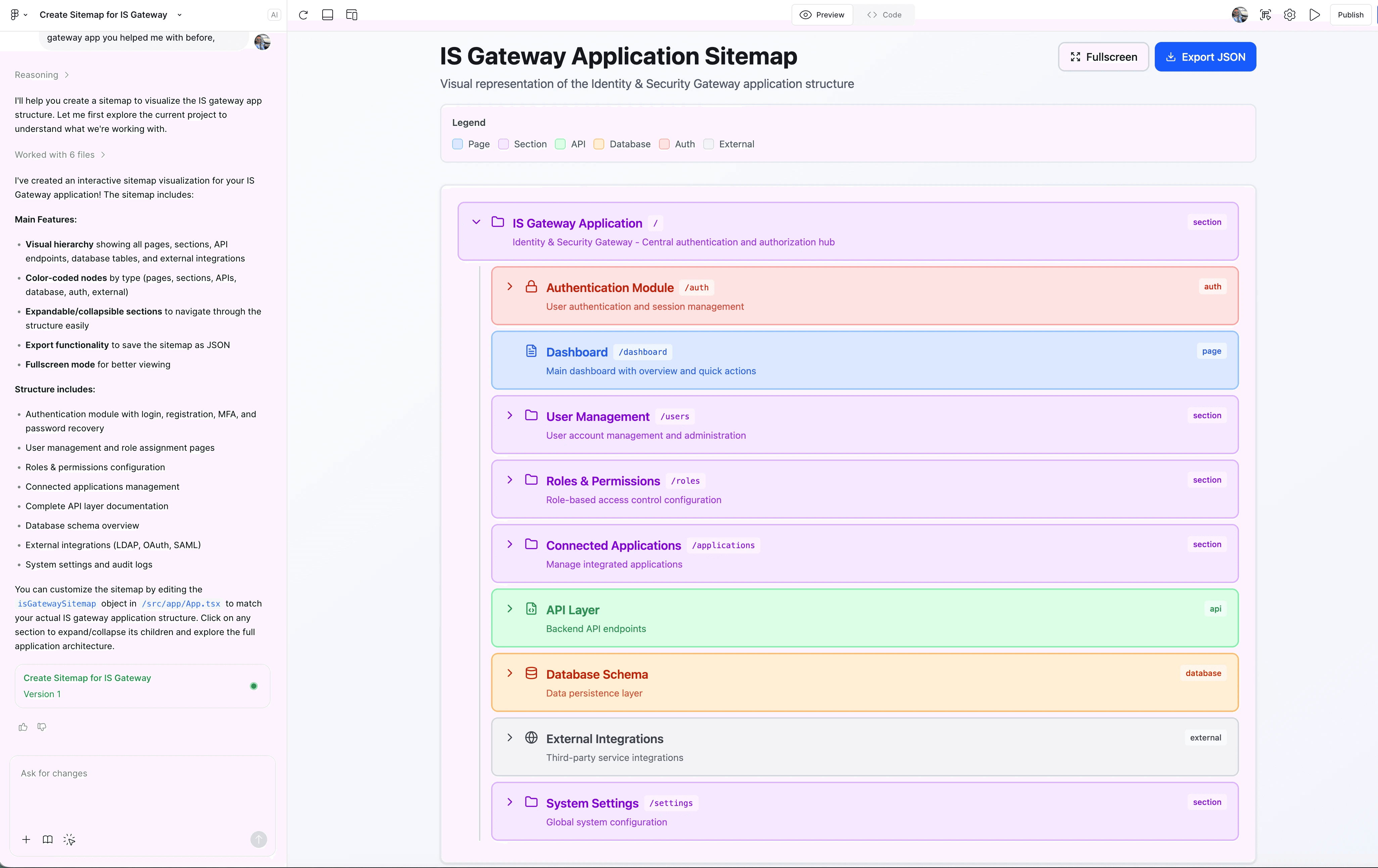
Key IA decisions: • Gateway dashboard as the default entry point • Each application represented as a modular card • Clear separation between: • System status • Application access • Admin and design system areas Navigation was designed to scale as new applications are added.
3
Information Architecture
Key IA decisions: • Gateway dashboard as the default entry point • Each application represented as a modular card • Clear separation between: • System status • Application access • Admin and design system areas Navigation was designed to scale as new applications are added.
4
UI & Visual Design
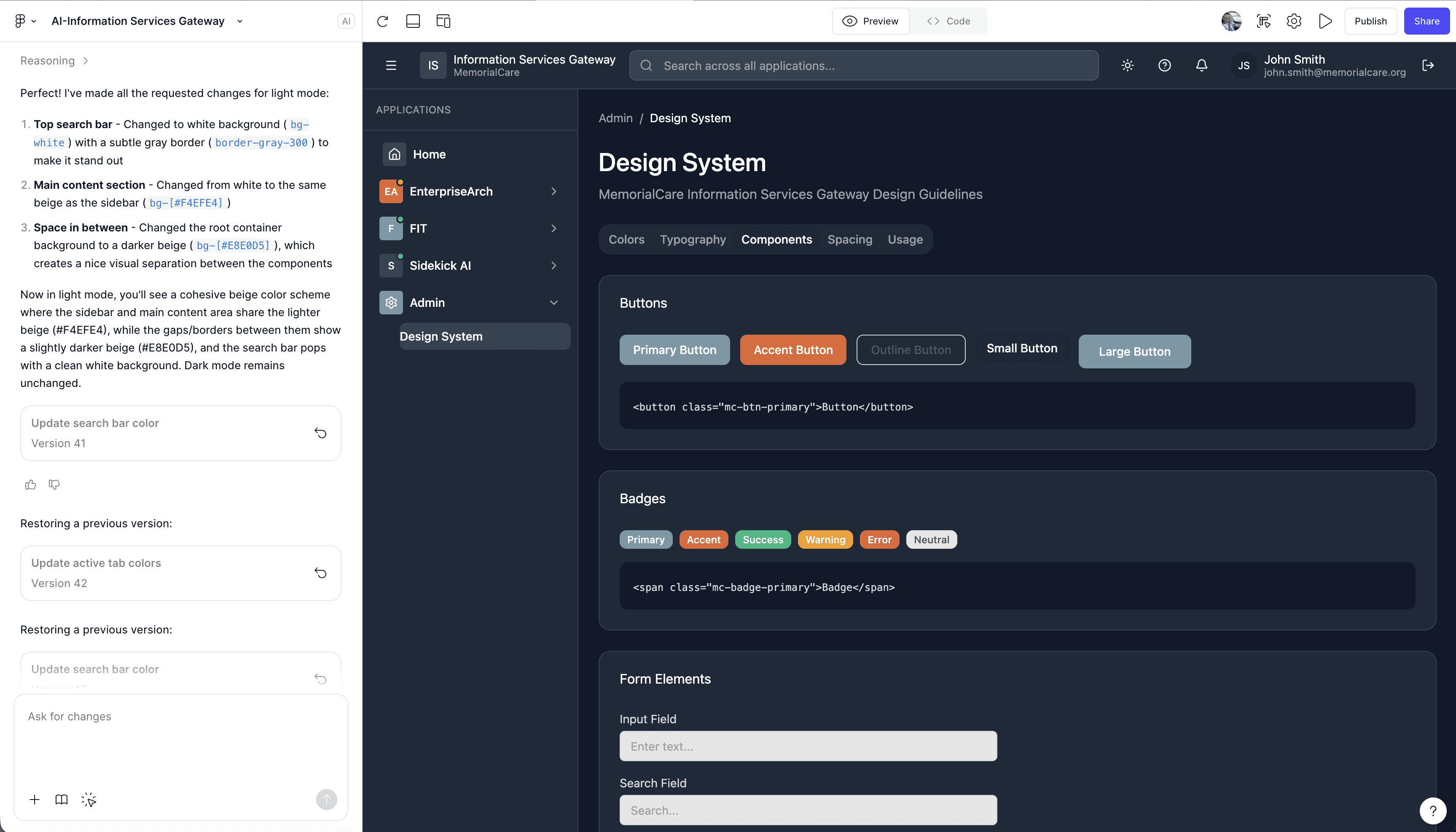
I designed: • A high-contrast dark theme optimized for long technical work sessions • A light theme for broader accessibility and preference • Status indicators (Operational, Maintenance, Warning, Error) with clear semantic color usage • Reusable components aligned with enterprise constraints Accessibility considerations: • Color contrast compliance (WCAG 2.1) • Clear visual hierarchy and readable typography • Icon + label combinations to avoid color-only meaning
4
UI & Visual Design
I designed: • A high-contrast dark theme optimized for long technical work sessions • A light theme for broader accessibility and preference • Status indicators (Operational, Maintenance, Warning, Error) with clear semantic color usage • Reusable components aligned with enterprise constraints Accessibility considerations: • Color contrast compliance (WCAG 2.1) • Clear visual hierarchy and readable typography • Icon + label combinations to avoid color-only meaning
5
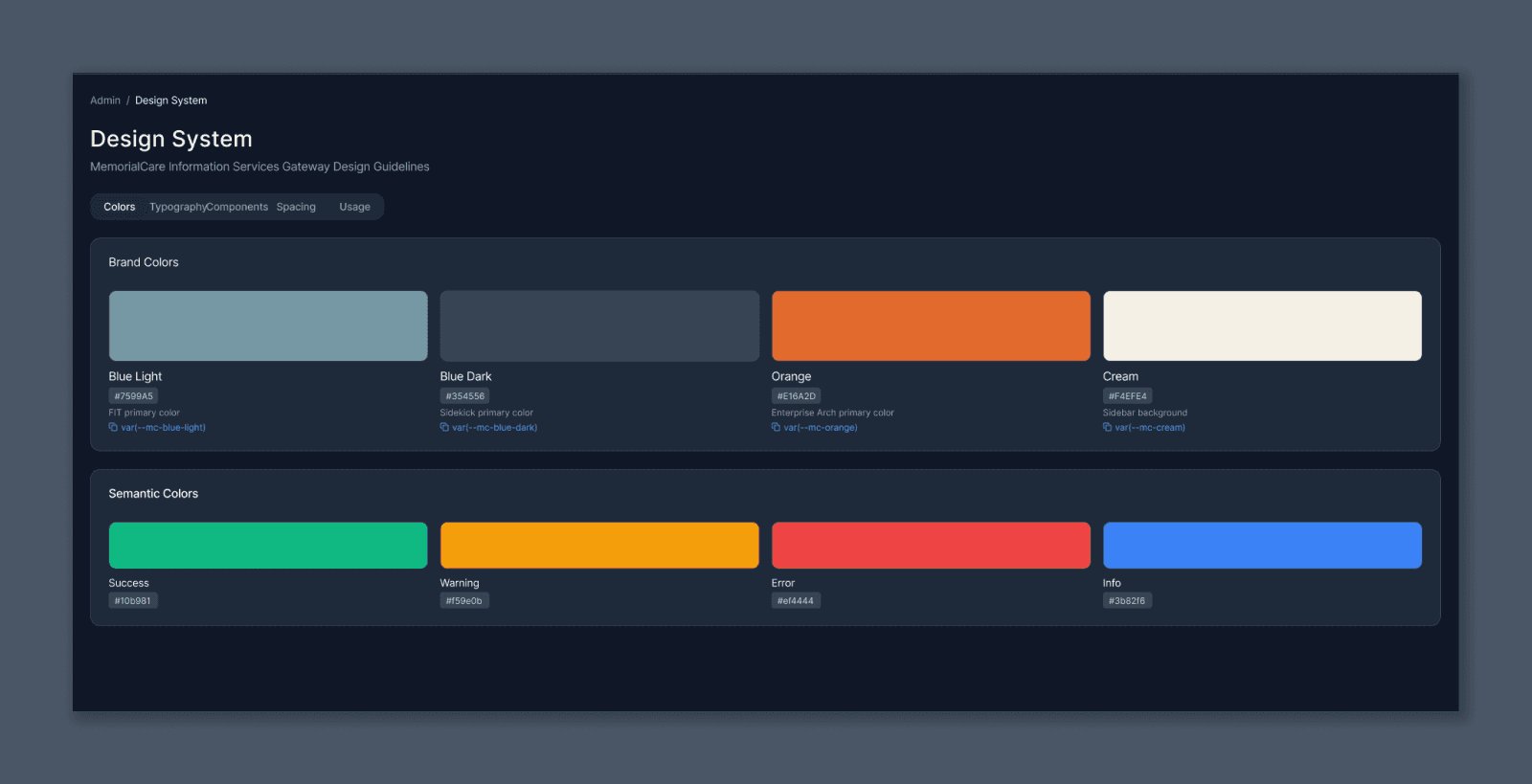
Design System Foundations
As part of this project, I created: • Brand and semantic color tokens • Component patterns reusable across IS applications • Documented spacing, typography, and usage rules This ensured: • Faster future development • Consistency across teams • Lower design and engineering debt
5
Design System Foundations
As part of this project, I created: • Brand and semantic color tokens • Component patterns reusable across IS applications • Documented spacing, typography, and usage rules This ensured: • Faster future development • Consistency across teams • Lower design and engineering debt
Impact
Since rollout
Stakeholders reported improved clarity and faster system checks
The gateway is being used as the foundation for additional IS tools
Design system components are now reused across multiple internal apps
This project is actively evolving, with additional features and integrations in progress.
What I’d Improve Next
Add role-based personalization (what each user sees first)
Introduce historical system health trends
Expand global search across applications and documentation
Tools
Tools
Figma
Figma Make AI
Miro
Microsoft Teams
ChatGPT
Claude